AI PR Reviewer & Auto-Fixer
Every new pull request is reviewed file by file and scored, reviewers get a Teams summary, and an AI fix loop repairs the blocking issues, then opens a fix PR back into the developer's branch.
Demo build: created to show how this kind of system works. No client name, figures or testimonials are implied.

- Trigger
- New pull request (webhook)
- Platform
- Azure DevOps + Microsoft Teams
- Fix loop
- Review → fix → re-review, max 3 rounds
Problem
Code review is a bottleneck. Reviewers find out about a pull request late, then spend their time on the same recurring problems: missing error handling, duplicated code, unclear naming, unsafe input. Developers wait for feedback, fix it, and wait again.
What we built
An n8n automation that starts the moment a pull request is opened. It tells the assigned reviewers straight away, reviews every changed file with AI, posts a short executive summary to Microsoft Teams, and then tries to fix the problems itself. When the fixes pass a second review, it pushes them to a new branch and opens a pull request into the developer’s branch, so the developer just reviews and merges.
Key features
- Instant reviewer alerts: each assigned reviewer gets a direct Teams message with the repository, PR and author.
- File-by-file AI review: every changed source file is scored out of 10 and checked against ten areas, including SOLID, DRY, error handling, security and performance. Each finding has a severity (Critical, Major or Minor), a line number and a recommended fix.
- Executive summary in Teams: the per-file reviews are condensed into one message: PR status, issue counts, top blockers and refactoring themes.
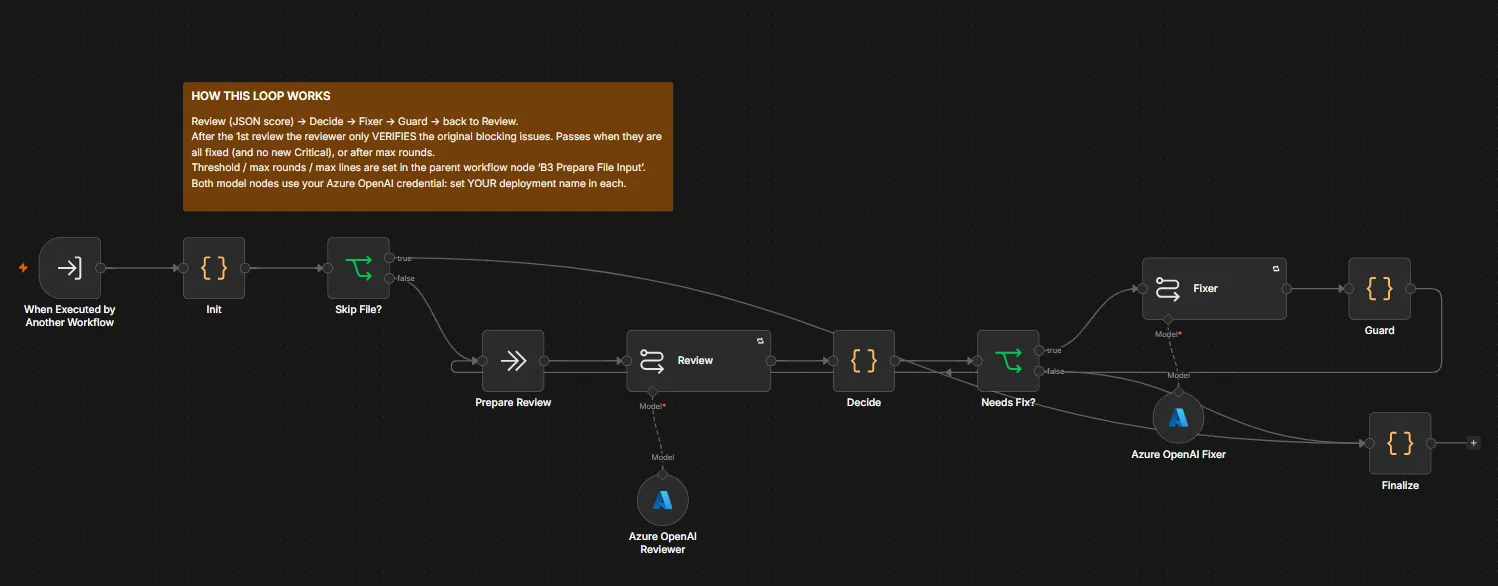
- Review-and-fix loop: a fixer model repairs the blocking issues, a guard checks the change, and the reviewer re-checks the original issues. It repeats until they are fixed with no new Critical issues, or for at most 3 rounds.
- Fix PR, not a silent push: fixes go to a new
ai-fix/branch, a pull request is opened into the developer’s branch, and a comment on the original PR links to it. - Loop guard: PRs from
ai-fix/branches are ignored, so the workflow never reviews its own fixes forever.
How it works
- An Azure DevOps webhook fires when a pull request is created.
- Branch 1: reviewers are looked up in Microsoft Graph and messaged in a one-on-one Teams chat.
- Branch 2: the latest PR iteration’s changed files are fetched, binaries and build files are filtered out, each file is reviewed by GPT-4o-mini, and the results are summarised into a Teams message.
- Branch 3: files are passed to a sub-workflow that loops review → decide → fix → guard → review, with the score threshold, max rounds and max file size set in one place.
- If any file improved enough, the workflow creates the branch, pushes the fixes and opens the pull request.
Tech
- Orchestration: n8n (main workflow + reusable review/fix sub-workflow)
- AI: Azure OpenAI (GPT-4o-mini) for review, summary and fixes
- Source control: Azure DevOps REST API (iterations, changes, items, pushes, pull requests, threads)
- Messaging: Microsoft Teams via Microsoft Graph
Result
A demo build. It is designed to:
- get reviewers looking at a PR in minutes, not hours;
- give every PR a consistent first-pass review before a human opens it;
- turn routine fixes into a ready-made PR the developer only has to approve.
Humans stay in charge: nothing is merged automatically.